Manga AI - AI Comic Generator
- 4.0
- Rating
- 100.00K
- Installs
- Free
- Price
 Analysis by App-foxy
I approached Manga AI - AI Comic Generator as a practical creative tool rather than a replacement for a full drawing studio. Its main appeal is simple: I can start with a story idea or an image and turn that starting point into manga-style comic material without first learning illustration software. That makes it approachable, especially when I want to explore a character, visualize a scene, or build a rough webtoon concept quickly.
My overall view is positive, but with an important qualification. This is best understood as an idea generator and visual drafting companion. It can help me move from a blank page to something concrete, but I would not depend on it alone for a polished, consistent comic series. The app is free to install, aimed at Everyone, and sits in the Comics category, so its audience is broader than professional artists. Its strongest value appears when speed and experimentation matter more than exact art direction.
Turning a written idea into a comic starting point
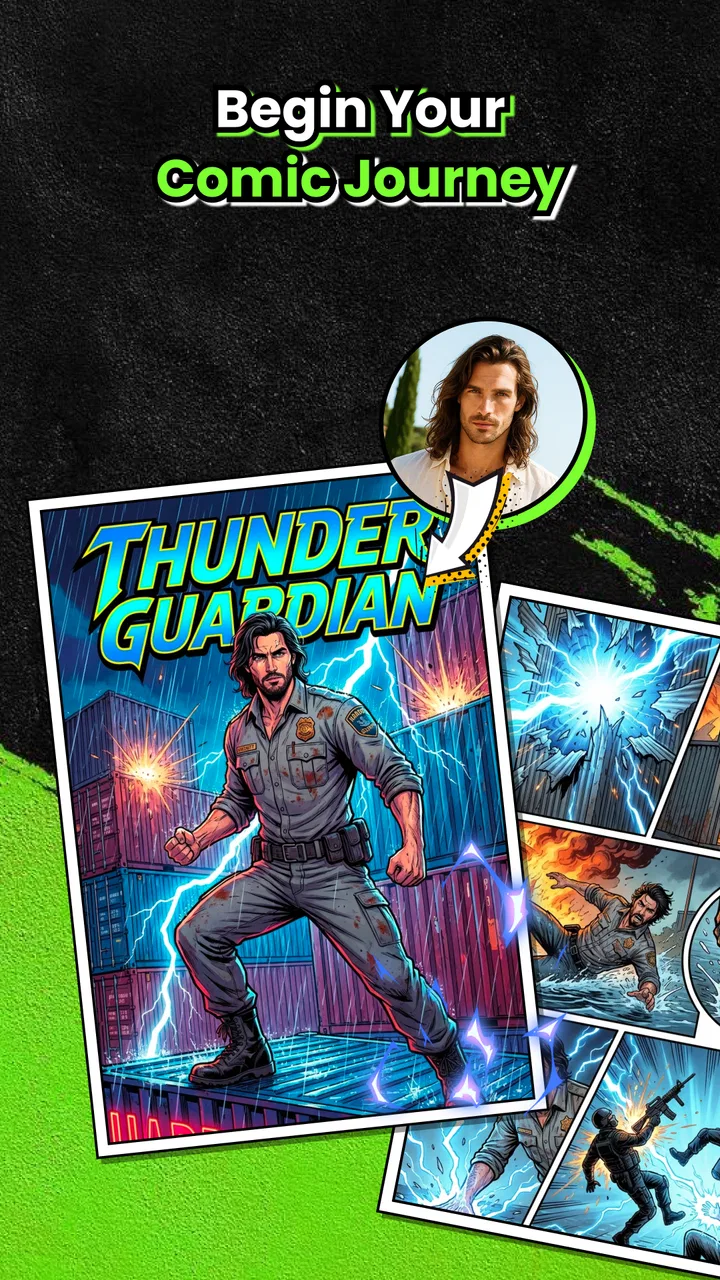
The most useful part of the experience is the gap it closes between writing and drawing. I can think through a short scene in words, add a photo when I want a visual reference, and use that material as the foundation for manga, manhwa, or webtoon-style work. That workflow feels much less intimidating than opening a traditional illustration app and facing a completely empty canvas.
You May Also Like

 Blood Strike: 2.5 Anniversary
Blood Strike’s Loadouts Turn Every Drop Into a Tactical Gamble
A close look at Blood Strike’s custom loadouts: how fast access to signature weapons reshapes its battle royale rhythm, rewards preparation, and narrows the gap between fights.

 Pandora - Music & Podcasts
Pandora’s Music Is Easy to Start, but Harder to Recover
Pandora’s strength is its low-effort path from a seed to a station. Its weak spot is how much confidence it asks you to place in connection, setup, and quiet recovery.

 8 Ball Pool
 Is Built on Rivalries, Rematches, and Routine
A close look at the rivalries, rematches, shared routines, and unanswered safety questions that turn a quick pool match into a persistent mobile community.

 Samsung Music
’s Quiet Strength Is Playing What You Already Own
Its reach comes less from spectacle than from dependable access to a personal library. That simplicity is both the app’s strongest retention engine and its ceiling.

 AccuWeather: Weather Radar
AccuWeather Review: A Quick, Clear Forecast for Everyday Decisions
For everyday plans, the best forecast is the one you can understand quickly. AccuWeather makes rain timing, radar, and local conditions easy to act on, with a few trade-offs.

 Hill Climb Racing
Why Hill Climb Racing Still Turns Crashes Into One More Run
A tiny car, a bumpy hill and one more upgrade: Hill Climb Racing keeps resurfacing because its simple chaos makes every near-miss feel personal.
More From Our News Desk



For example, imagine I have a simple idea about two friends discovering a locked room after school. In a conventional drawing app, I would need to plan the characters, setting, poses, framing, and visual mood before I had anything to show. With this app, I can begin with the scene itself and use the generated result as a visual prompt. Even if the first outcome needs correction, it gives me something specific to react to instead of forcing me to invent every detail in my head.
That distinction matters. I found the app more valuable for visual exploration than for finishing pages. It helps answer questions such as whether a scene feels better as a close-up, whether a character suits a dramatic style, or whether a photo can inspire a fictional design. The result can become a reference for later work, a quick concept to share with friends, or the first draft of a personal comic project.
The photo-based workflow is also useful outside traditional manga making. Someone planning a birthday comic could use a family image as inspiration for a playful scene. A writer could turn a location photo into a setting reference. A student working on a visual story could test several interpretations of the same idea before choosing a direction. These are modest use cases, but they are exactly where an AI comic tool can save time.
Why the story-first approach works
Many creative apps begin with tools: brushes, layers, panels, fonts, masks, and export controls. Those tools are valuable when I already know how I want to build the page. This app starts closer to the thought itself. That makes it a better fit for people who have stories but lack confidence in their drawing ability.
I also like the possibility of using it during the planning stage rather than waiting until the complete script is ready. A rough scene can reveal that a character description is too vague or that an action is difficult to picture. In that sense, the app can act as a visual editing step. I can spot weaknesses in an idea earlier, before spending hours drawing a page that does not work.
My advice is to treat the first result as a conversation with the idea, not as a final answer. Short, concrete descriptions are usually a better starting point than a paragraph packed with unrelated details. I would describe the subject, action, setting, and mood separately, then refine the concept after seeing what the app produces. This makes the process more controlled and helps me understand which part of the scene needs improvement.
A useful habit is to keep the story stable while changing only one visual element at a time. If I alter the character, location, mood, and camera angle together, it becomes difficult to tell what improved the result. Testing one change at a time turns casual experimentation into a repeatable workflow. That is a more advanced use of the app than simply tapping through random ideas, and it makes the generated material more useful for an actual project.
Where it fits beside ordinary comic apps
Compared with a standard drawing application, Manga AI - AI Comic Generator is faster at producing a visual starting point and less demanding for beginners. A drawing app gives me precise control over every line, panel, and correction, but that control comes with a learning curve and a much slower first step. Here, I trade detailed control for momentum.
Compared with a template-based comic maker, this app is more useful when I want the visuals to grow from a story or a photo rather than from fixed layouts. Templates are often better when I need predictable panels, captions, and page structure. This app is more interesting when the challenge is imagining the characters and atmosphere in the first place.
It also differs from a conventional writing app. A writing app is still the better choice for outlining a long plot, tracking dialogue, and managing revisions. The comic generator adds value when I need to see the story. I would not replace my writing notes with it; I would use it after or alongside them.
That trade-off is the central reason I recommend it selectively. If precise anatomy, permanent character identity, and panel-by-panel editing are the priorities, a dedicated illustration or comic production tool will be stronger. If the goal is to make a visual draft quickly, this app offers a friendlier route.
What impressed me, and where the experience becomes less reliable
The strongest evidence in its favor is how quickly it lowers the cost of trying an idea. I can test a premise without committing to a full drawing session. That makes it suitable for brainstorming, mood boards, personal storytelling, and early webtoon planning. The app is also approachable for people who may never consider themselves artists, because the first step is closer to describing an idea than mastering a brush.
Another strength is the bridge between ordinary photos and fictional comic concepts. A photo can provide a recognizable starting point, while the manga treatment gives it a different identity. This can be especially effective for personal projects where the emotional connection comes from the original image. I would still review the result carefully, but the transformation can make a familiar subject feel new.
The app’s current version is 2.0.7, and its public reception is encouraging: it holds a 4.4 average from around 5.7 thousand ratings, with over 100 thousand installs. Those figures suggest that the concept has found a real audience, although they do not change my practical conclusion that the app works best as a creative aid rather than a complete production environment.
The developer is listed as Video & Music AI - Create Video & Make Songs. That name signals a broader AI-creation focus, while this particular app is aimed at comic and manga-style output. I found that positioning helpful when setting expectations: it feels designed to help generate creative material quickly, not to reproduce the full workflow of a professional comic studio.
The main weakness is control and consistency
My biggest reservation is the distance between an attractive single image and a coherent sequence. A comic is not just a collection of appealing pictures. Characters need to remain recognizable, actions need to make sense from panel to panel, and the reader needs to understand the order and emotional rhythm of the scene. An AI-generated image can be useful on its own while still creating extra work when I try to connect it to the next moment.
This is where a traditional comic workflow has a clear advantage. With manual drawing or a structured comic editor, I can deliberately preserve a character’s clothing, expression, proportions, and position. With AI-assisted generation, I need to inspect each result and be prepared to revise the concept or use the output only as reference material. Anyone expecting a finished episode from a short prompt may find that gap frustrating.
Text and storytelling also require human attention. Even when the visual direction is promising, I would not assume that the image alone communicates every part of the plot. Dialogue, captions, panel order, and pacing still need editorial decisions. For a serious story, I would write the script separately, decide what each panel must communicate, and use the app to support the visual development rather than letting it determine the narrative.
There is also a practical cost consideration. The app is free to use at its basic entry point, but in-app purchases range from $4.99 to $79.99 per item. That broad range makes it important to think about how often I will use the generation workflow before spending money. Casual users may be satisfied with occasional experimentation, while someone developing a large project should examine the purchase choices carefully and avoid assuming that free installation means every creative need will remain free.
This is not necessarily a flaw; AI generation can involve meaningful usage costs. Still, it changes the recommendation. I would try the free experience first, decide whether the visual direction suits my project, and only then consider a purchase. I would not pay simply because the first result looks exciting. The real test is whether the app repeatedly helps me develop scenes that I can actually use.
Three workflows that make it more useful
First, I would use it for thumbnail planning. Before drawing a page, I can create rough visual possibilities for an important scene and compare the mood, framing, and character arrangement. The goal is not to publish those images. The goal is to make better decisions before investing time in detailed artwork. This is particularly useful for creators who struggle with composition.
Second, I would use it as a character-discovery tool. Instead of trying to define a character perfectly in one attempt, I would test a few descriptions that emphasize personality, clothing, age range, and emotional state. The results can expose which traits are visually clear and which are too abstract. I would then take the strongest ideas into a more controlled art workflow.
Third, I would use photos as private creative references for settings and everyday moments, then remove unnecessary details from the concept before developing the fictional scene. A street, room, outfit, or pose can provide useful grounding. This approach is better than asking the app to invent an entire world at once, because the reference gives the scene a concrete anchor.
These workflows reveal a trade-off that is easy to miss: the app saves time at the imagination stage but may require more judgment afterward. It is efficient when I use it to make choices, not when I expect it to make every choice for me.
Who should install it?
I would recommend it to aspiring manga and webtoon creators who have ideas but limited drawing experience. It is also a good match for writers who want to see their scenes, casual users making personal comics, and artists who need fast visual references before opening a more precise tool. The Everyone content rating makes it approachable for a broad audience, though younger users should still understand that creative results may need adult guidance when photos or personal stories are involved.
It can also suit teachers, students, and hobby groups looking for a quick way to discuss visual storytelling. A generated scene can give a group something concrete to critique: Is the setting clear? Does the mood match the script? Does the character look like the person described? That makes the app useful as a discussion starter, even when the final artwork will be made elsewhere.
I would skip it if my main requirement is professional page production with exact, repeatable control. It is not the first app I would choose for a long-running series where character continuity is more important than speed. I would also look elsewhere if I only want to draw manually, because the AI-centered approach may feel like an unnecessary layer between my idea and the finished linework.
People who dislike revising generated material may also become disappointed. The app is most rewarding when I am willing to compare attempts, simplify a scene, adjust expectations, and treat unexpected details as suggestions rather than guaranteed instructions. If I need the software to obey a detailed visual plan exactly, a conventional comic editor will probably be less frustrating.
My verdict after weighing the trade-offs
Manga AI - AI Comic Generator succeeds because it makes comic experimentation feel immediate. Its story-and-photo starting points are more inviting than a blank drawing canvas, and its manga-oriented focus gives casual ideas a recognizable visual direction. I appreciate it most as a bridge: it carries a rough thought toward a visual draft, then lets me decide what deserves further work.
Its limitations are equally clear. It should not be confused with a complete comic studio, a replacement for writing, or a guarantee of consistent characters across a finished sequence. The strongest results come from users who understand where AI helps and where human editing remains essential. I would plan the story elsewhere, use this app to explore scenes and references, and finish the project with tools that offer more deliberate control.
For a free app in the Comics category, with a 4.4 average and over 100 thousand installs, it is worth trying if I want to turn ideas into visual possibilities quickly. I would begin without spending, test it on a small scene, and judge the results by whether they improve my decisions rather than merely looking attractive. My recommendation is clear: use it as a fast comic ideation partner, not as the entire comic-making process.
FAQs for Manga AI - AI Comic Generator
01What is Manga AI - AI Comic Generator?
Manga AI - AI Comic Generator is an innovative app that allows users to create their own manga or comic strips using artificial intelligence. The app provides various templates, characters, and scenes, which can be customized to fit your storytelling style. It’s perfect for both beginners and experienced manga artists looking to experiment with AI tools.
02How does the AI feature work in Manga AI?
The AI feature in Manga AI analyzes your input, such as text and style preferences, to generate comic panels automatically. It uses advanced algorithms to create artwork that matches your chosen theme, ensuring that each panel is unique and visually appealing. This makes it easy for users to produce professional-looking comics without extensive drawing skills.
03Is Manga AI suitable for professional comic artists?
Yes, Manga AI is suitable for professional artists. While it is user-friendly enough for beginners, professionals can benefit from its advanced features, such as custom template creation and detailed scene editing. The app can serve as a quick tool for drafting ideas or experimenting with different artistic styles without the need for extensive manual drawing.
04Can I share my creations from Manga AI?
Absolutely! Manga AI allows users to easily share their creations on various social media platforms or export them as high-quality images. This feature is perfect for artists looking to showcase their work or receive feedback from a community. The app also supports collaboration, so you can work on projects with friends or colleagues.
05What are the system requirements for using Manga AI?
Manga AI is compatible with both Android and iOS devices. It requires a minimum of Android 8.0 or iOS 13.0 to run smoothly. Ensure that your device has sufficient storage space and a stable internet connection for optimal performance. Regular updates may also be needed to access new features and improvements.
Pros
- Innovative AI-driven comic creation.
- User-friendly interface for beginners.
- Offers a wide range of styles.
- Fast rendering of images.
- Regular updates with new features.
Cons
- Limited free features available.
- Occasional crashes on older devices.
- Requires internet for full functionality.
- In-app purchases can be pricey.
- AI results can be inconsistent.

Manga AI - AI Comic Generator
Gallery